As a new blogger building EarnGears.com, I’ve learned how important a professional website is. For my next project, I wanted to see if it’s possible to start with a zero-dollar budget. So, I spent the last few weeks researching the best free website builders available in 2025.
This post is a summary of my personal research into five of the most popular platforms. I’ll share my findings on Wix, Weebly, WordPress.com, Strikingly, and SITE123, and then, at the end, I’ll reveal my final decision and tell you exactly why I chose one platform over the others for my new blogging website.
My Research on 5 Popular Free Website Builders
Here are my notes and takeaways on the five platforms I explored.
1. Wix – The AI-Powered Drag-and-Drop Builder
My Research Findings: Wix seems incredibly powerful for beginners because of its AI website generator and true drag-and-drop editor. It feels like the fastest way to get a professional-looking site live without any design skills. The Limitations I Found: The free plan has Wix branding (ads) on the site and a small 500MB storage limit.
2. Weebly – The E-Commerce Starter
My Research Findings: My research indicates that Weebly’s main strength is its built-in e-commerce features on the free plan, allowing you to list up to 10 products and accept payments.
The Limitations I Found: The free plan includes Square branding and a Weebly subdomain.
3. WordPress.com – The Content and SEO King
My Research Findings: Based on my own experience with this blog, I know WordPress is the best for content and long-term SEO. Its free plan is generous with an AI assistant and basic analytics.
The Limitations I Found: The main limitation is less design freedom compared to a builder like Wix.
4. Strikingly – The One-Page Website Specialist
My Research Findings: What I learned is that Strikingly specializes in creating beautiful, simple, one-page websites very quickly. It seems perfect for a local business or a simple landing page.
The Limitations I Found: The free plan is limited to a single page and has a 500MB monthly bandwidth limit.
5. SITE123 – The Easiest, Most Guided Builder
My Research Findings: My research suggests that SITE123 is designed for the absolute beginner who has zero tech skills. It’s less about design freedom and more about getting a clean, functional site online with zero stress.
The Limitations I Found: The free plan has the most restrictions, with only 250MB of storage and visible branding.
My Final Decision: Why I'm Choosing Wix for My Next Blog
After comparing all five platforms, I’ve decided to go with Wix for my next blogging website.
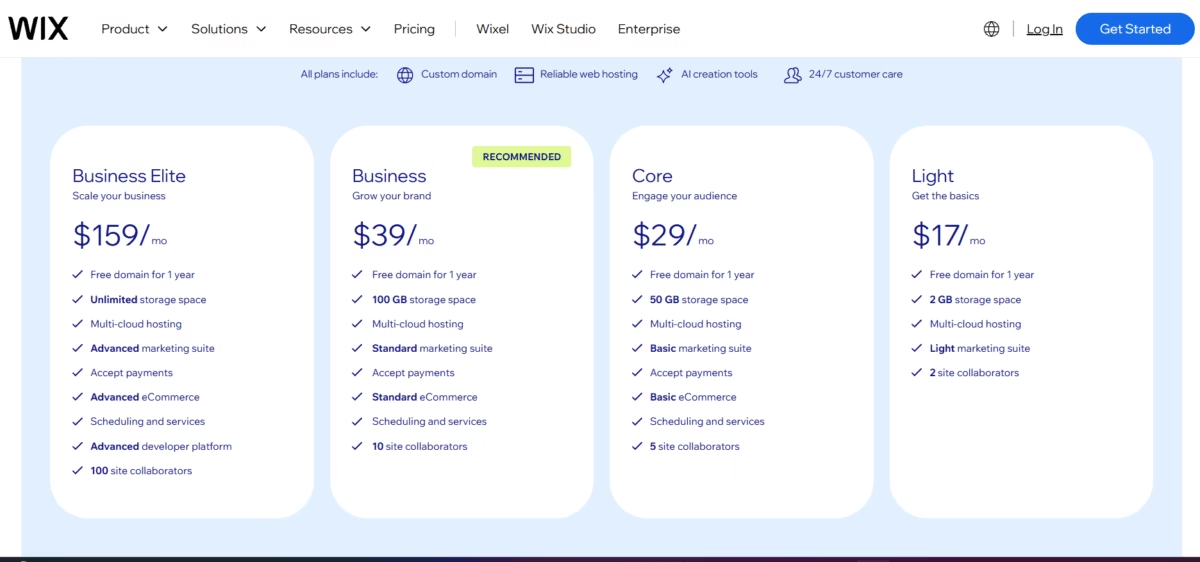
The main reason is its ease of use. As a beginner, the drag-and-drop editor feels less intimidating than other options. But the deciding factor for me was the pricing. Their ‘Light’ plan at $17/month seems very affordable for a beginner to get started with a professional site. The fact that it includes a free domain for the first year really touched my heart and made the decision easy.

The Wix pricing plans I was researching. The ‘Light’ plan with the free domain for a year was the deciding factor for me.
Finally, Wix is a well-known and trusted brand in the market, which gives me confidence. Currently, I am exploring the Wix editor daily to prepare for my new project, and I will be sharing my journey of building a site with it soon.
FAQs
Further Reading
Disclaimer:
The information provided in this article is for educational and informational purposes only. The results from online earning strategies can vary greatly and depend on individual effort, market conditions, and other factors. Please do your own research before making any financial or business decisions.
About The Author