After starting my new blog, EarnGears.com, I quickly realized that writing good content is only half the battle. Getting that content to rank on Google is a whole different challenge. As a beginner with a limited budget, I can’t afford expensive SEO tools that cost hundreds of dollars a month.
So, I spent the last few weeks researching and testing free SEO tools to find out what really works. This post isn’t an “expert guide.” It is a look into my personal toolkit—a summary of the tools I am actually using right now and the ones I have researched for the future. I’m sharing my experience so other new bloggers can also get started with zero investment.
1. Google Analytics 4 (GA4) – From Confusion to Clarity
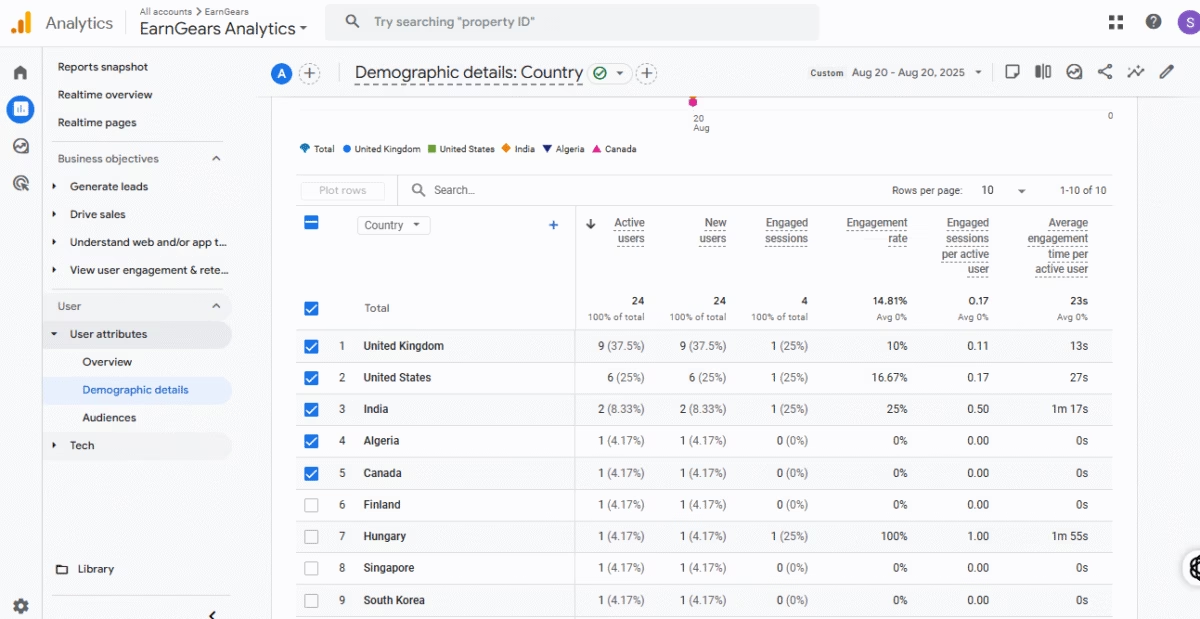
My Real Experience with GA4: To be honest, when I first set up Google Analytics 4, it seemed very difficult. The dashboard was confusing, and I didn’t know what to look for. But then, I watched a few tutorials on YouTube and started to understand how powerful this tool is.
Now, I use it every day to see important data, like how many active users are on my site, which countries they are visiting from, and how much time they are spending on my pages. Because it’s a Google tool, I trust its data 100%. It’s the only way I know if my hard work is paying off.

2. Google Search Console (GSC) – My Weekly "Report Card"
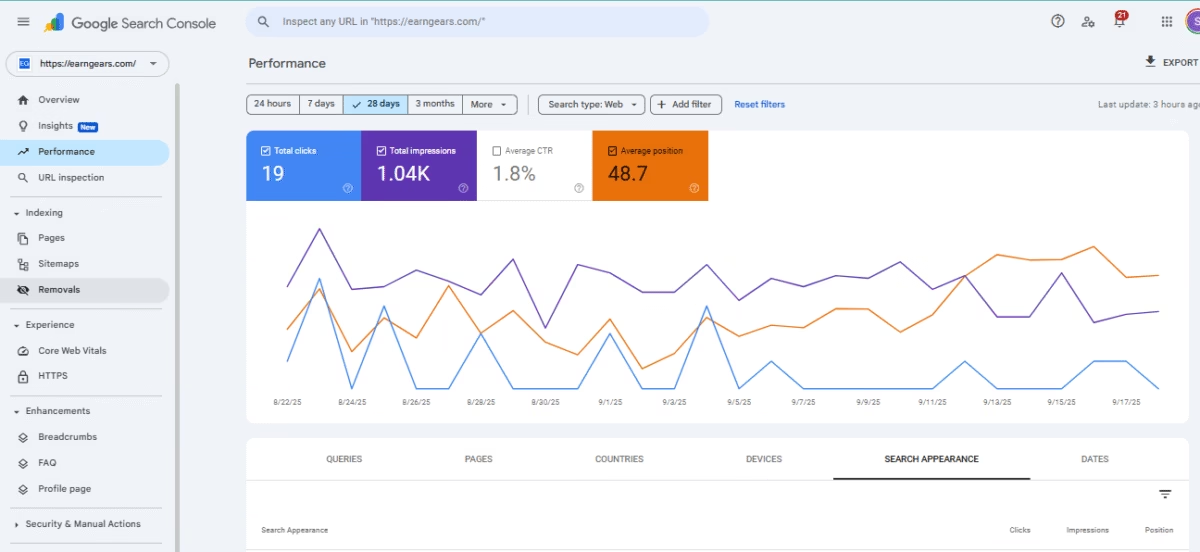
My Real Experience with GSC: This tool is excellent and, for me, was very simple to learn. It only took me 1-2 days to understand the main reports. I think of GSC as a direct line of communication with Google.
Now, I check it regularly to see my website’s data, like which of my pages are indexed by Google and which are not. I especially love the “Performance” tab, where I can see how many clicks I’m getting, from which pages, and from which countries. It’s the most honest feedback I can get for my SEO efforts.

3. Ubersuggest – How I Research Competitor Ideas
My Research on Ubersuggest:
While the Google tools tell me about my own site, I needed a way to see what’s working for other blogs. During my research, I found Neil Patel’s Ubersuggest. Its free version gives 3 free searches a day, which is great for a beginner.
While researching this tool, I found a very smart strategy: You can enter a competitor’s URL and see their “Top Pages” report. This shows you exactly which of their articles are getting the most traffic. My plan is to use this feature once a week to analyze 2-3 other blogs in my niche. This will give me a constant stream of topic ideas that I know people are already interested in.
4. Google Keyword Planner – My Starting Point for Ideas
My Research on Keyword Planner:
This was the first tool I researched for SEO. I learned that it’s part of Google Ads, but it’s completely free to use for research if you have a Google account. From my research, I found its 3 main uses: finding new keywords, seeing their monthly search volume, and checking the competition level (low, medium, high).
The feature that I found most useful is the location filter. You can see keyword data for a specific country or even a city, like “london,” which seems very powerful for local businesses. Because the data comes directly from Google, I feel it’s the most reliable place to start my research.
5. AnswerThePublic – My Future Tool for Content Ideas
My Research on AnswerThePublic:
When I was researching how to find content ideas, this tool came up again and again. Its most unique feature, I found, is that it takes a keyword and turns it into a visual map of questions (like What, Why, How, Where).
I also researched and found that question-based headlines and articles tend to rank well on Google because they directly answer a user’s query, especially for voice search. Therefore, this tool is on my list to use whenever I get stuck for new article ideas in the future.
FAQs
About The Author